Manage Projects
Projects are the core organizational unit in WebSpeaker. Each project represents a single website or application and contains its own content configuration, widget settings, conversations, and contacts. This guide covers how to create, rename, transfer, and delete projects.
Creating New Projects
To create a new project, click the plus icon in the sidebar on the right side of the portal. A dialog will appear asking for a project name. Enter a descriptive name, such as the website’s name or domain, and confirm. The project is created immediately and you can begin configuring it.
Each new project starts with default settings and an empty knowledge base. You will need to configure scraping, set up the widget, and embed the script snippet on your website.
The number of projects available to your organization depends on the active plan. If you cannot create or move another project, check Organization -> Billing to review your plan limits and billing state. See Manage Billing for more details.
Transferring Projects
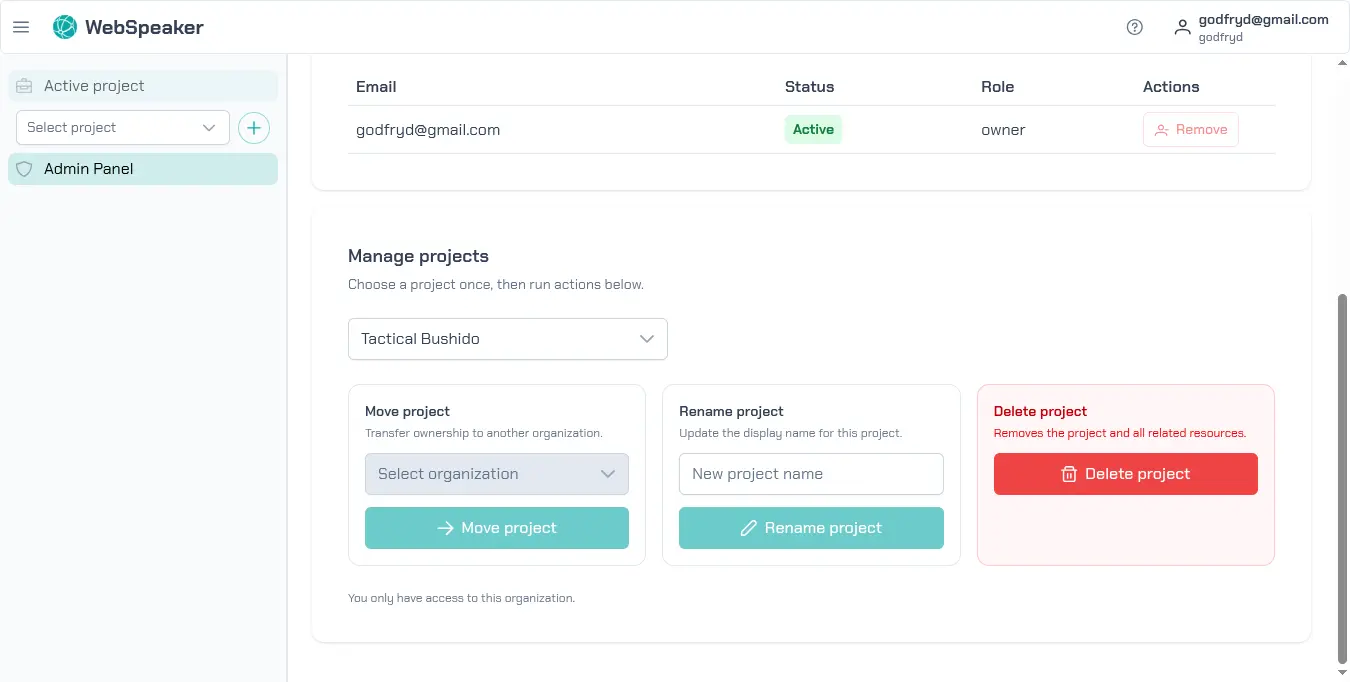
Projects can be transferred between organizations. This is useful when restructuring your teams, moving a client project to their own organization, or consolidating projects from multiple organizations into one. To transfer a project, go to Organization -> General, select the project, and use the move option.
When a project is transferred, all its data moves with it, including content collections, widget configuration, conversations, and contacts. The access key remains the same, so the widget snippet on the website does not need to be updated.
Renaming Projects
To rename a project, go to Organization -> General, select the project you want to rename, enter the new name, and click Rename project. Renaming does not affect the project’s configuration, content, or access key. It is purely a display name change.
Deleting Projects
To delete a project, go to Organization -> General, select the project, and click Delete project. A confirmation dialog will appear warning that the project and all of its resources will be permanently removed. This action cannot be undone.
Deleting a project removes all associated data, including scraped content, widget configuration, conversation history, and contact records. After deletion, the widget on the associated website will stop functioning and the snippet should be removed from the site’s HTML.