Support Preferences
Support preferences let you personalize how your support agents appear to visitors and how agents are notified about new messages. These settings help create a professional, branded experience for your visitors while ensuring your team stays responsive.
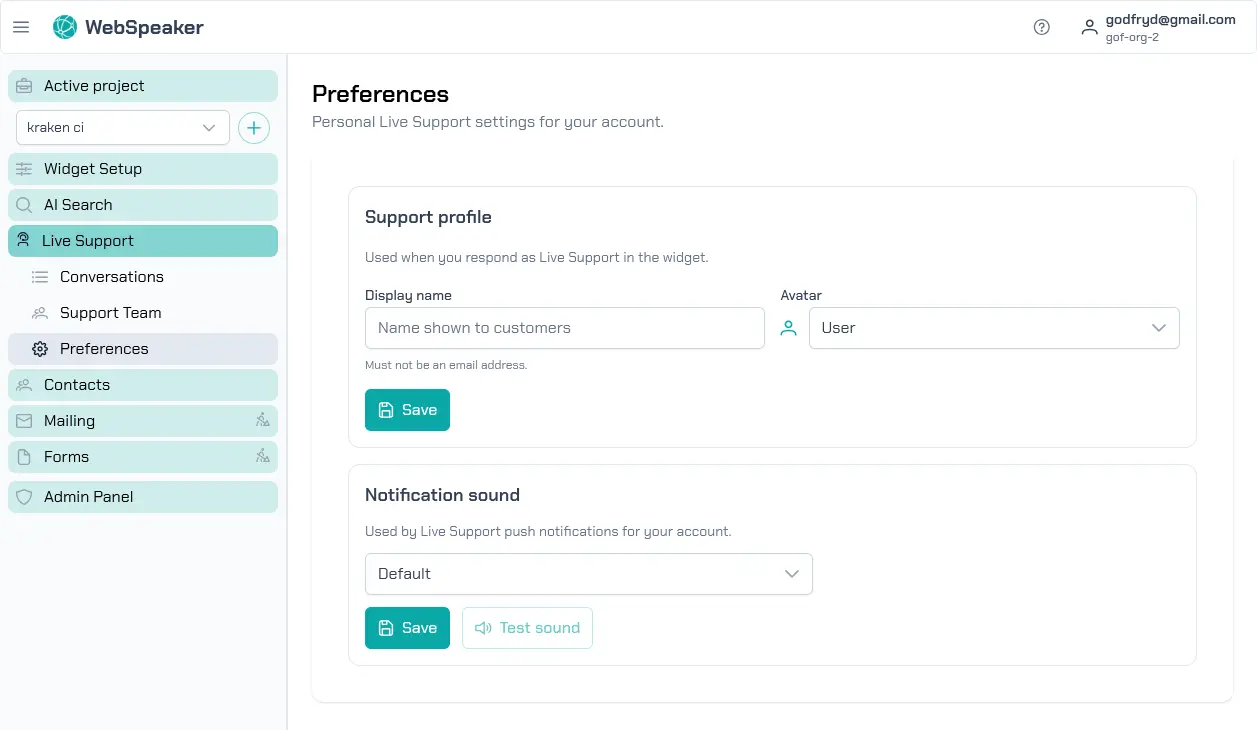
Display Name
Each support agent can set a display name that visitors see in the chat interface. This name appears alongside messages sent by the agent, giving the conversation a personal touch. Agents can configure their display name through Live Support -> Preferences.
Choose display names that are professional and approachable. Using real first names (e.g., “Sarah” or “Alex”) creates a friendly, human connection. Alternatively, you can use role-based names (e.g., “Support Team” or “Technical Support”) if you prefer a less personal approach. The display name is shown to visitors in the chat window, so make sure it represents your brand appropriately.
Avatar Image
In addition to the display name, agents can upload an avatar image that appears next to their messages in the chat interface. A profile photo or branded icon makes the conversation feel more personal and helps visitors identify who they are speaking with.
Upload a clear, appropriately-sized image through the support preferences in the portal. The avatar is displayed as a small circular thumbnail in the chat window, so choose an image that looks good at a small size. If no avatar is uploaded, a default placeholder icon is shown instead.
Notification Sounds
To ensure agents do not miss incoming messages, the support dashboard and mobile app play notification sounds when new messages arrive. Agents can configure their notification preferences to choose which sounds to use or to mute notifications entirely.
Notification sounds are particularly important when agents are multitasking and may not have the support dashboard in the foreground. A distinct notification sound alerts the agent to new visitor messages, enabling faster response times. On the mobile app, notifications integrate with the device’s system notifications, so agents receive alerts even when the app is in the background.
Applying Preferences
Changes to support preferences take effect immediately. The display name and avatar update in real time for any new messages sent by the agent. Visitors who are already in an active conversation will see the updated name and avatar on subsequent messages.
Each agent manages their own preferences independently. This means different team members can have different display names and avatars, which is useful if your support team consists of multiple people with different areas of expertise or responsibility.