Configure Scraping
Before WebSpeaker can power AI search on your website, it needs to build a knowledge base from your content. This is done through the scraping configuration, where you define which pages to crawl, what content to extract, and what to skip. Proper configuration ensures that the AI has access to relevant, high-quality content and ignores noise like navigation menus, footers, or irrelevant pages.
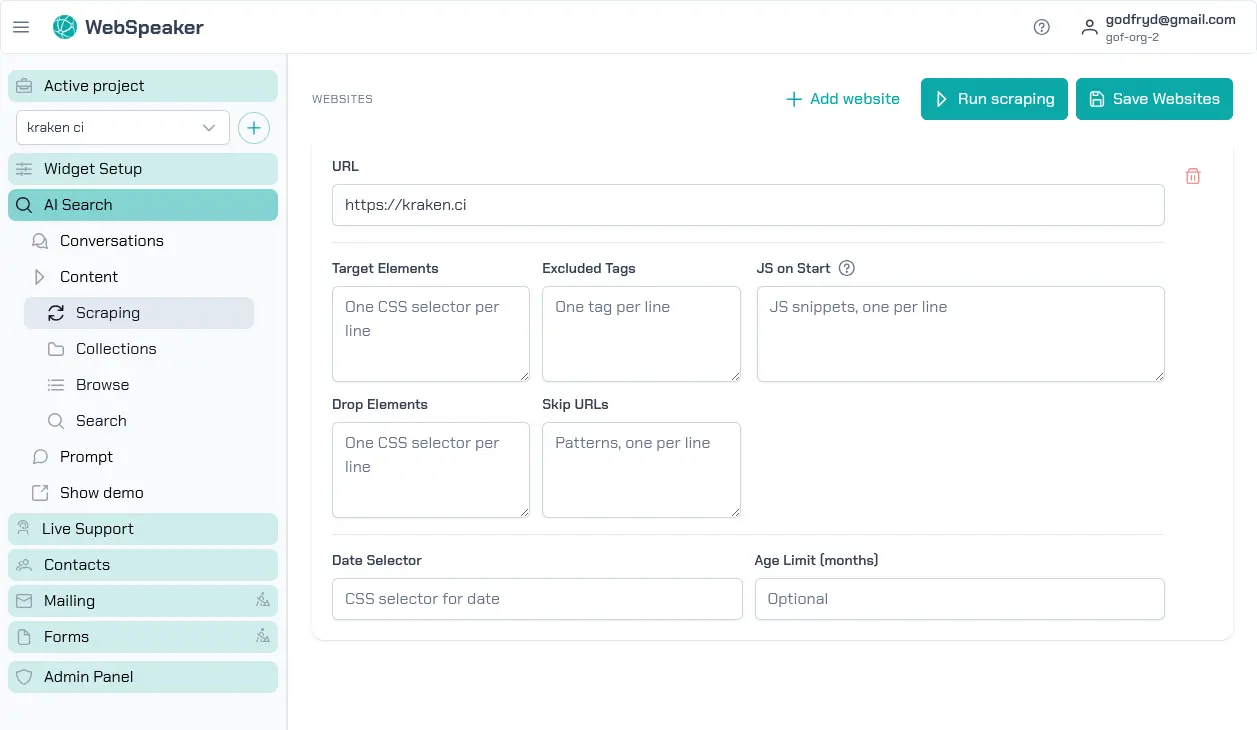
Add Website URLs
In the management portal, navigate to your project and open the AI Search -> Content -> Scraping section. Here you can add one or more root URLs that WebSpeaker should start crawling from. The scraper follows links found on these pages to discover additional content, building a comprehensive map of your site. You can add multiple starting URLs if your content is spread across different sections or subdomains.
Each URL entry defines a crawling scope. The scraper will follow internal links within the same domain by default, discovering pages automatically. You do not need to list every individual page; just provide the entry points and the scraper will take care of the rest.
Each website URL in a project must be unique. WebSpeaker treats every website entry as a separate scraping scope, so adding the same root URL twice would only duplicate configuration and crawling work.
Configure Sitemap URL
Each website entry can optionally include a Sitemap URL. When you provide it, WebSpeaker first tries to collect page URLs from that exact sitemap before falling back to automatic discovery. This is useful when your website exposes a reliable sitemap and you want tighter control over what gets crawled.
The sitemap URL must be a valid http or https address and must stay on
the same host as the configured website. WebSpeaker validates the sitemap
when you save the configuration and shows how many page URLs were detected.
Use Multiple Website Entries
You can configure multiple website entries inside one project. This is the recommended way to handle different sections of the same site when they need different crawling scopes or scraping rules.
For example, you can add one website entry for https://example.com/ with
its own sitemap, and another for https://example.com/blog/ with a
different sitemap or different skip rules. Each entry can have its own:
- Sitemap URL
- CSS selectors
- skip URL patterns
- JavaScript hooks
- date selector and content age limit
This gives you more control than trying to merge multiple sitemap sources into one website entry. It also makes the configuration easier to reason about when different sections of the site behave differently.
Configure CSS Selectors
To ensure that only meaningful content is extracted from each page,
you can define CSS selectors that target specific areas of your
HTML. For example, if your main content is inside an <article> tag
or a <div class="content"> element, you can specify that selector
so the scraper ignores headers, sidebars, footers, and other
peripheral elements. This produces cleaner text that leads to more
grounded and relevant search results.
You can configure both include selectors (which elements to extract content from) and exclude selectors (which elements to skip even if they appear within the included area). This gives you fine-grained control over what ends up in your knowledge base.
Set Up Skip URL Patterns
Not every page on your website is relevant for the knowledge base. You can define URL patterns to skip during crawling. For example, you might want to exclude login pages, admin panels, paginated listing pages, or URLs containing specific query parameters. Skip patterns accept standard pattern matching, allowing you to filter out entire sections of your site efficiently.
Common patterns to skip include URLs containing /admin, /login,
/cart, or pagination parameters like ?page=. Setting up
appropriate skip patterns reduces the amount of irrelevant content
in your knowledge base and speeds up the scraping process.
JavaScript Hooks for Dynamic Content
Some websites load content dynamically using JavaScript. If your pages rely on client-side rendering or lazy loading, the scraper may not capture all the content from the initial HTML alone. WebSpeaker supports JavaScript hooks that allow you to configure how the scraper handles dynamic content. This ensures that content rendered after the initial page load is also captured and included in the knowledge base.
Content Age Limits
You can configure content age limits to exclude pages that were published a long time ago. When you set an age limit in months, the scraper skips any page whose publication date is older than the specified threshold. This is useful for websites with a large archive of outdated content, such as news sites or blogs, where old articles are no longer relevant. By setting an age limit, you ensure that only recent content is included in your knowledge base and that visitors receive up-to-date answers from the AI search.
Use the Date selector field to specify a CSS selector pointing to
the HTML element that contains the publication date on your pages
(e.g. time.published, .post-date). The scraper reads the date
from that element and compares it against the age limit to decide
whether the page should be included.
Review your scraping configuration carefully before triggering a run. A well-tuned configuration produces a clean, focused knowledge base that directly improves the quality of AI search results.
Schedule Automatic Refreshes
If your website content changes regularly, you can automate scraping runs instead of starting them manually every time. In the management portal, open AI Search -> Content -> Scraping and switch to the Scheduled Refresh tab.
You can choose one of three modes:
- Manual — scraping runs only when you start them yourself.
- Daily — WebSpeaker starts a new scraping run once per day at the selected hour.
- Weekly — WebSpeaker starts a new scraping run once per week on the selected weekday and hour.
For automatic modes, select the hour and timezone that should be used to calculate the run time. Weekly mode also requires the weekday. The schedule uses hourly precision, so you only choose the hour, not the exact minute.
Every scheduled run creates a new collection, just like a manual run. The currently active collection keeps serving visitors until the new run finishes and the system activates the updated collection. This means you can refresh your knowledge base regularly without interrupting search availability.
If a scraping run is already in progress when the next scheduled time arrives, WebSpeaker skips starting another one in parallel. In the same tab you can also review Last refresh, Last result, and Next refresh to see whether the schedule is working as expected.