Review Conversations
WebSpeaker records all AI search conversations so you can review how visitors interact with the search feature, evaluate the quality of AI-generated responses, and identify areas where your content or configuration might need improvement.
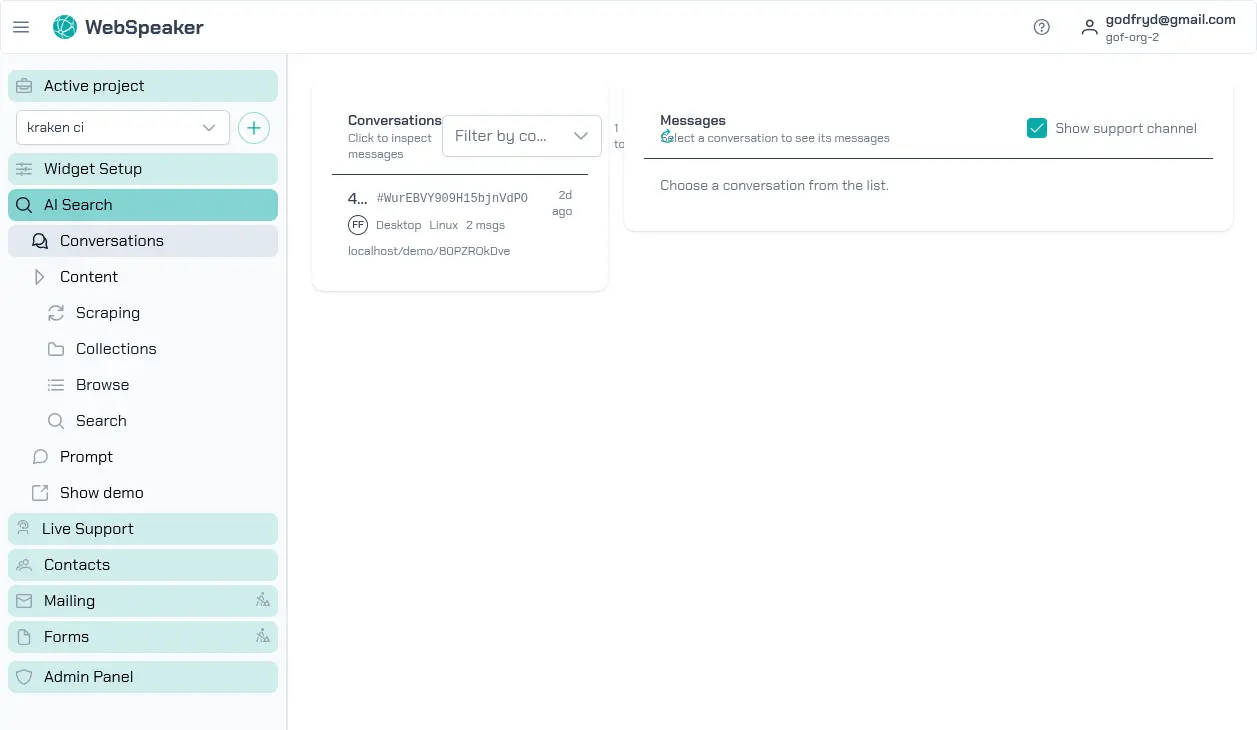
Viewing the Conversation List
In the management portal, navigate to your project and open the Conversations section under AI Search. You will see a chronological list of all conversations that visitors have had with the AI assistant. Each entry shows a preview of the conversation, the date and time, and summary information.
The conversation list helps you get a quick overview of what visitors are asking about. Patterns in the questions can reveal common topics of interest, frequently asked questions, or areas where your website content may be lacking.
Inspecting Individual Messages
Click on any conversation to view its full message history. Each message exchange shows the visitor’s question followed by the AI-generated response. You can read through the conversation to evaluate whether the responses were grounded, helpful, and properly scoped.
Pay attention to cases where the AI provided incorrect or incomplete answers. These instances highlight content gaps in your knowledge base or areas where your scraping configuration might need adjustment. If the AI consistently struggles with a particular topic, consider adding or improving the relevant content on your website and running a new scraping cycle.
Reviewing User Feedback
Visitors can provide feedback on AI responses using thumbs up and thumbs down buttons. This feedback is visible in the conversation view next to each response. Thumbs up indicates the visitor found the answer helpful, while thumbs down signals that the response did not meet their expectations.
Feedback data is valuable for continuous improvement. Focus on responses that received negative feedback to understand what went wrong. Common issues include answers that are technically correct but too vague, answers that reference the wrong content, or cases where the AI could not find relevant information. Use this feedback to guide improvements to your content, scraping configuration, and system prompt.
Checking Source Citations
Each AI-generated response includes source citations that reference the pages from your knowledge base used to compose the answer. In the conversation detail view, you can see which content chunks were retrieved and cited. This transparency lets you verify that the AI is drawing from the correct sources.
If you notice that responses are citing irrelevant or outdated pages, review your content collection to ensure it reflects your current website content. Removing outdated pages from the collection and running fresh scraping cycles helps keep the AI’s sources current and relevant.
Using Conversations for Improvement
Regularly reviewing conversations is one of the most effective ways to improve your WebSpeaker setup. By understanding what visitors ask, how the AI responds, and where it falls short, you can make targeted improvements to your content, refine your system prompt, and adjust your scraping configuration. Over time, this iterative process leads to increasingly grounded and helpful AI search results.